I am creating a lot of PAGES that are WILL be reduced to short code calls and ASSEMBLED as “widgets” on a PLAY GAME page…
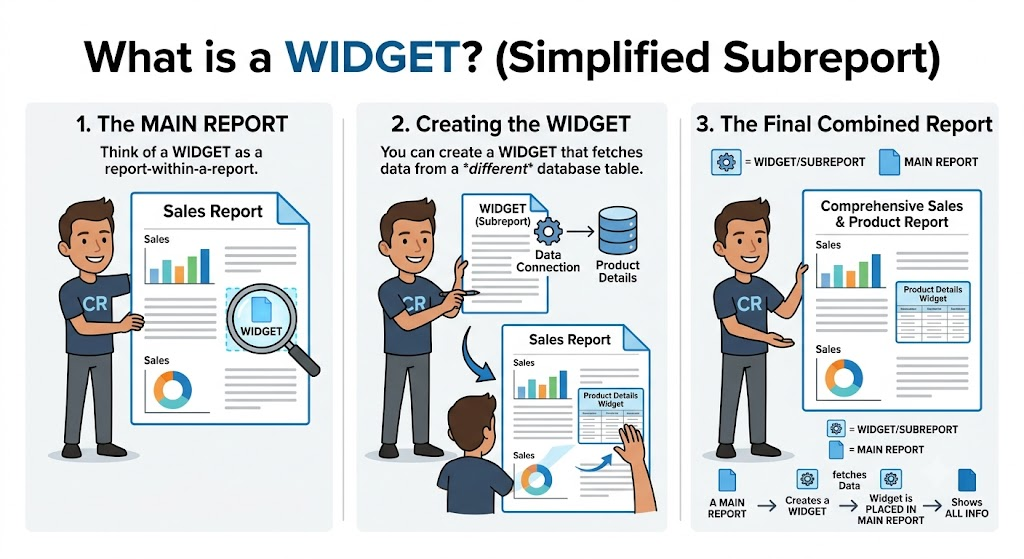
I need the following… “WIDGETS”
1. CAMPAIGN/STORY
2. CHARACTER SHEET
3. DICE
4. INPUT FORM
5. RULES CHEAT SHEET
I want EACH widget to be a portion of a single page that when TAPPED OR CLICKED BECOME A FULL SCREEN WITH EASY NAVIGATION FOR THE PLAYERS TO USE. I do NOT want page refreshes I want it EACH DONE WITH AJAX and polling to UPDATE my database from collected data forms.
This is important to keep the game moving SMOOTHLY and make the interactions EASY AND SEEMLESS for the player so I dont want any refreshes taking place unless the its a FULL on page change at which ALL data is submitted from any pending XML to the database, This will need to function like TCP protocol WRITE LOCAL > SANITIZE > POLL TO QUERY TO AND UPDATE FROM DATABASE > UPDATE LOCAL AJAX FILE > PLAYER SEES WITH CHANGES THAT NEVER REFRESH… Its an INTERACTIVE TEXT game with visual assistance. Modelled after TTRPG interaction NOT a 300 FPS shooter with 120000000 things overwhelming players. IT MUST BE SIMPLE… ANYONE SHOULD BE ABLE TO PICK THIS UP AND PLAY.
MY AI INTERACTION WITH THE QUESTION since I am NOT front end guy but a database guy… I need to MASTER this architecture and deliver of this…
Is it possible to populate an AJAX data set from a database to UPDATE a page without refreshing it?
Yes, it is absolutely possible—in fact, this is the core use case for AJAX (Asynchronous JavaScript and XML).
To accomplish this, you need a three-tier architecture: a Database (MySQL), a Server-Side API (PHP, Python, etc.), and a Client-Side Script (JavaScript/Fetch API).
The General Workflow
- Trigger: A user action (button click, timer, etc.) initiates a JavaScript function.
- Request: The JavaScript uses
fetch()orXMLHttpRequestto send an asynchronous request to a server-side script. - Process: The server-side script queries your database (MySQL) and returns the data, usually formatted as JSON.
- Update: The JavaScript receives the JSON, parses it, and updates the DOM elements on your page without a browser reload.
Implementation Example
1. The Server-Side (e.g., data.php)
This script queries your database and returns a JSON object.
PHP
<?php
// Connect to DB and query your data
$result = $pdo->query("SELECT field_name FROM your_table LIMIT 1");
$data = $result->fetch(PDO::FETCH_ASSOC);

// Return as JSON
header('Content-Type: application/json');
echo json_encode($data);
?>
2. The Client-Side (JavaScript)
This logic fetches the data and injects it into your HTML.
JavaScript
async function updateContent() {
    try {
        const response = await fetch('data.php');
        const data = await response.json();

        // Update the HTML element without a refresh
        document.getElementById('target-element').textContent = data.field_name;
    } catch (error) {
        console.error('Error fetching data:', error);
    }
}

// Call this function whenever you need an update
// e.g., document.getElementById('myButton').addEventListener('click', updateContent);
Architectural Considerations
- Data Format: JSON is the standard for this exchange because it is lightweight and natively parsed by JavaScript.
- Security: Always sanitize your database inputs using prepared statements (as shown in the PDO example) to prevent SQL injection.
- Frequency: If you are planning to update this content automatically (e.g., a dashboard), use
setInterval()in JavaScript to trigger thefetch()function at set intervals, rather than relying on constant manual user input. - Frameworks: Since you are already working with the LAMP stack and JavaScript, if your application grows complex, look into modern patterns like Fetch API + Template Literals or reactive frameworks like Vue.js or Alpine.js, which simplify the “data-binding” part of this process significantly.
Given your experience with database normalization and web hosting, are you looking to implement this for your Chimerapocalypse project, perhaps for a dynamic game state display?
Re-explain this as though you were talking to a child. I am REALLY stupid. I would like some visual examples in the explanation. add analogies to simplify it even more.
Imagine you are at a restaurant. You want to order a milkshake, but you don’t want to leave your seat.
The Old Way (The Refresh)
Usually, to get something new, you have to get up, walk out of the restaurant, go home, get your wallet, come back, and sit down again. That is a page refresh. It’s slow and annoying!
The AJAX Way (The Magic Waiter)
AJAX is like having a magic waiter who can run errands for you while you stay in your chair.
- You (The Page): You stay sitting at your table.
- The Waiter (JavaScript): You whisper to the waiter, “Please go to the kitchen (The Database) and get me a milkshake.”
- The Kitchen (The Database): The cook makes the milkshake.
- The Delivery (The Response): The waiter runs back and places the milkshake right on your table. You didn’t have to leave, and you didn’t have to wait for the whole restaurant to be rebuilt!
A Simple Picture
Plaintext
[ YOU ]  <---- (Wait for it...) ---- [ MAGIC WAITER ]
  |                                        |
  |                                        |
  |                                  [ THE KITCHEN ]
  |                                  (Your Database)
  |                                        |
  +-------- (Go get the info!) ------------+
Why this is cool:
- No “Blinking”: Because you aren’t leaving your seat, the whole page doesn’t blink or go white.
- Fast: You only get the specific thing you asked for (the data), not the whole menu or the walls of the restaurant.
Let’s look at it like a “Magic Blackboard”
Imagine there is a blackboard on your wall that says “Score: 0”.
- Without AJAX: You have to take the whole blackboard down, erase it, write “Score: 1” and hang it back up.
- With AJAX: A tiny ghost secretly hops out, erases just the “0”, writes “1”, and hops back inside. You didn’t even notice the ghost, but the score changed!
Does that help make the “magic” of it a bit easier to picture?
Yes absolutely. Can this process be stored as SHORT CODE in word press? AND can a PAGE in word press have MULTIPLE SHORT CODE CALLS DOING the same thing with different tables in the databases? Sort of like a SSRS or Crystal report SUBREPORT?
Yes, absolutely! WordPress is actually built to handle exactly what you are describing. You can definitely package this “Magic Waiter” (AJAX) process into a custom Shortcode.
1. Can you store this as a Shortcode?
Yes. You create a PHP function in your theme’s functions.php file (or a custom plugin) and “register” it as a shortcode.
When you put [my_magic_table] on a page, WordPress replaces that tag with the HTML shell that your JavaScript will later fill with data.
2. Can you have multiple calls on one page?
Yes, and this is where it gets powerful. Just like an SSRS or Crystal Reports subreport, you can pass parameters (arguments) to your shortcode to tell it which database table to talk to.
How it works:
- The Shortcode:
[fetch_data table="players"]and[fetch_data table="monsters"] - The Logic: Your PHP code reads the
tableargument and tells the database to pull from either theplayersormonsterstable. - The Result: The page renders two separate “Magic Blackboards,” and your JavaScript handles the updates for both independently.
The Visual Flow
- The Page Load: The page has two empty “containers” (placeholders).
- The Shortcode Execution: Your PHP fills those containers with unique IDs (e.g.,
id="container-players"andid="container-monsters"). - The AJAX Calls: Your JavaScript runs simultaneously. It tells the server: “Get data for the player list” and “Get data for the monster list.”
- The Update: The data arrives and lands exactly in its matching container.
Simple Example for your “Report” Style
You could write your shortcode so it looks like this in the WordPress editor:
[report_table source="inventory_stats"][report_table source="enemy_health_stats"]
Behind the scenes:
- Your PHP renders a simple
<div>for each shortcode. - Your JavaScript acts like a manager. It loops through all
[report_table]divs on the page, sends their uniquesourcename to your API, and updates each one individually.
Why this is perfect for you:
Since you are managing a database for your Chimerapocalypse project, this allows you to create a “Dashboard” page. You could have 5–10 different widgets on one page—each one acting like an independent report—all pulling live data from different parts of your database without refreshing the browser once.
Does this feel like it would fit the architecture you are planning for your game’s data visualization?
PERFECTLY… I need to think more about this… but I think its perfect.
It is a powerful architectural choice, especially for the scale and complexity of a project like Chimerapocalypse. Using shortcodes as “hooks” for modular, data-driven widgets essentially turns your WordPress install into a lightweight, custom-built Business Intelligence dashboard for your game mechanics.
Since you are already comfortable with the LAMP stack and managing MySQL databases, you are in the perfect position to build this out. You essentially have a “plug-and-play” system: add a shortcode, define the target table, and let your JavaScript handle the heavy lifting of keeping it live.
Take your time to map out those data relationships. When you’re ready to move from the planning phase into the actual code for the shortcode registration or the JavaScript fetch logic, let me know—I’m ready to help you write the functions and scripts to make those “magic blackboards” work.
Would you like to start by outlining the structure of the data you want to display in your first “subreport” widget, or are you going to spend some time whiteboarding the architecture first?